

Playground
Understand what AISIX Enterprise playground requests can validate compared with gateway requests.
The playground lets you test a single-target model from the AISIX Enterprise control plane. Use it to confirm that the model can reach its upstream provider and return a chat response before sending application traffic through the gateway.
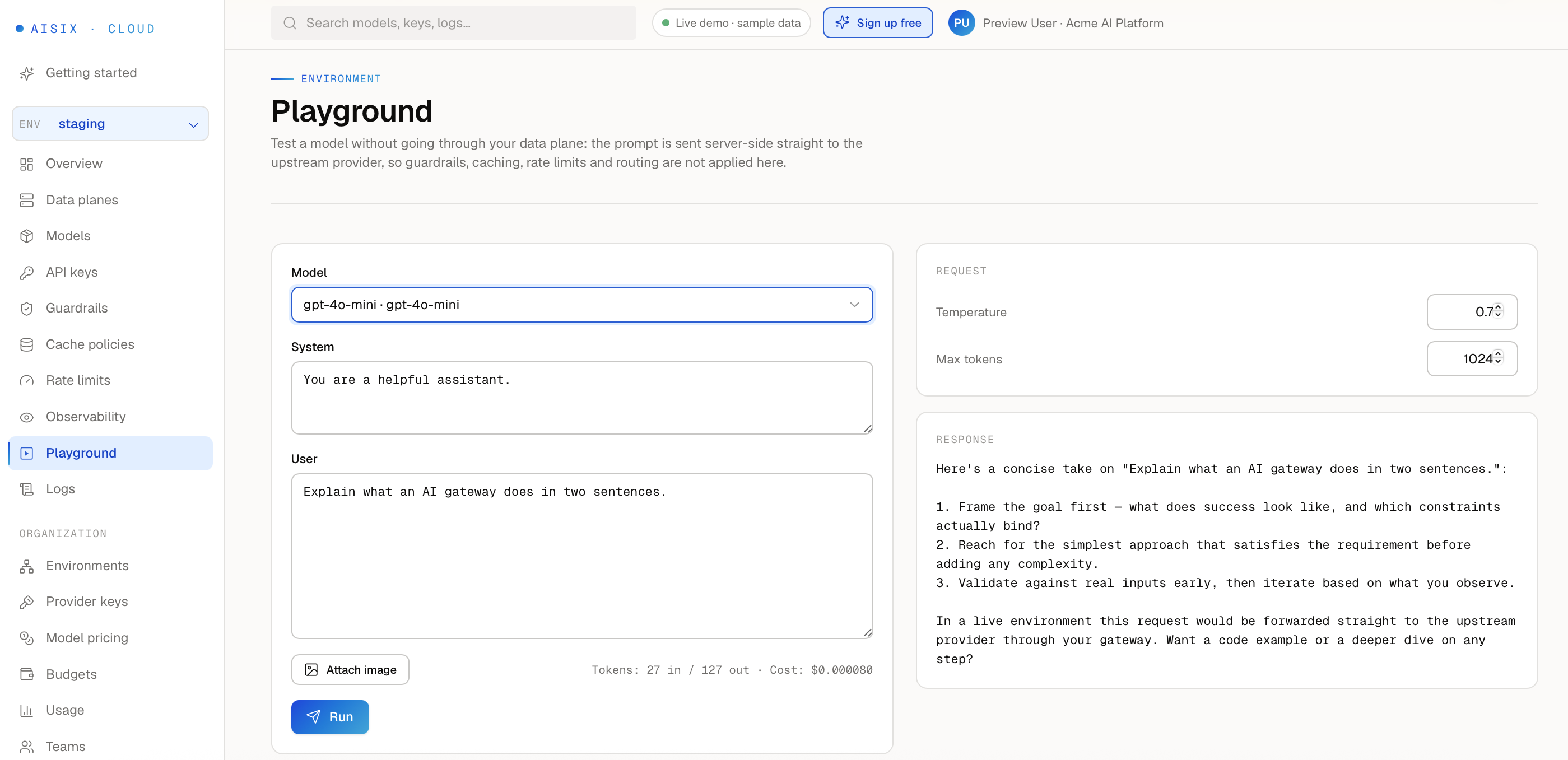
Walkthrough: Test a Model Before Wiring Code
Use this sequence to confirm a model works before pointing an application at it.
- Open the playground from the organization or environment navigation in the AISIX Enterprise control plane.
- Select the environment, then select a model that already has a working provider key configured.
- Enter a short prompt.
- Send the prompt.
- Read the response. A successful reply confirms the provider key, upstream base URL, and model name are all correct. An error surfaces the same failure an application would hit calling that model through the gateway, before any application code is involved.
Testing Models in the Playground
Playground requests run from the control plane to the upstream provider. Use them to validate the provider key, upstream base URL, model name, and basic prompt response from the control plane UI.
The playground sends OpenAI-compatible chat-completions requests. Use it with single-target models whose provider key points to an OpenAI-compatible upstream base URL, including Anthropic-backed models exposed through an OpenAI-compatible endpoint.
What the Playground Does and Doesn't Record
Playground requests bypass the AISIX gateway entirely, so they leave none of the trails a gateway request would:
- They are not recorded in Request Logs, Usage, AISIX gateway metrics, or external telemetry exporter output.
- Budgets and rate limits configured in AISIX Enterprise do not apply to playground requests.
- The response is shown only in that browser session. It is not persisted anywhere, and there is no request ID to look it up later — refreshing or leaving the page loses it.
Each run still calls the real upstream provider using the model's actual provider key, so it consumes that provider's quota and is billed by the provider exactly like any other API call — a playground test is not free or sandboxed on the provider side, even though it is invisible to AISIX Enterprise's own usage and budget tracking.
Playground vs. Gateway Traffic
Use this comparison to decide which one answers the question in front of you.
| What it validates | Playground | Gateway traffic (curl or your app) |
|---|---|---|
| Caller API keys | Not used — you authenticate as a signed-in control-plane user | Required; validates the key's own model access and lifecycle state |
| Model dispatch | Single-target (direct) models only | Any model alias, including routing, semantic, and ensemble models |
| Endpoint families | Chat Completions only, in OpenAI-compatible format | Every endpoint family AISIX exposes |
| Routing rules and failover | Not exercised | Exercised |
| Cache behavior | Not exercised | Exercised |
| Guardrails | Not exercised | Exercised |
| Budgets | Not enforced | Enforced |
| Rate limits | Not enforced | Enforced |
| Streaming behavior | Bypassed — the request never reaches the gateway's streaming path | Exercised |
| Request Logs, Usage, and metrics | Not recorded | Recorded |
Use the playground for the quick "does this model work at all" check. Use AISIX gateway traffic — through curl or your application — when you need to validate any row where the playground says "not exercised" or "not enforced," or when you need an endpoint family or provider-specific protocol behavior beyond chat completions.
Reach Private-Network Endpoints On Premises
The playground proxy refuses to connect to private, internal, or loopback IP addresses by default. This server-side request forgery (SSRF) protection prevents the control plane from reaching internal network services through a crafted model endpoint. On-Premises may need to reach an LLM endpoint on an internal network, while AISIX Cloud (the API7-hosted control plane) expects public upstream endpoints. A blocked request fails with the error code UPSTREAM_PRIVATE_IP_BLOCKED.
To let the playground reach a private-network endpoint, set AISIX_PLAYGROUND_ALLOW_PRIVATE_IPS=1 on the control-plane API service and restart it:
- Offline package (Docker Compose): uncomment
AISIX_PLAYGROUND_ALLOW_PRIVATE_IPS=1in.env, then rundocker compose up -d api. - Helm chart: set
api.playgroundAllowPrivateIPs=true.
Leave the default in place when your model endpoints are public. This setting affects only the playground proxy; the data plane always reaches upstream providers directly and is unaffected.
Next Steps
Continue with Usage Reporting to understand gateway usage, spend, and budget-related signals.