

Security Hardening Reference
Learn about securing sensitive information in API7 Gateway, including storage, encryption, and communication practices to protect against threats.
Infrastructure security is an important topic that organizations scrutinize to stay compliant with the latest regulatory and legal requirements. Understanding where and how sensitive information is stored is of paramount importance to implement the security measures that safeguard against unauthorized access, data breaches, or malicious attacks in your organization.
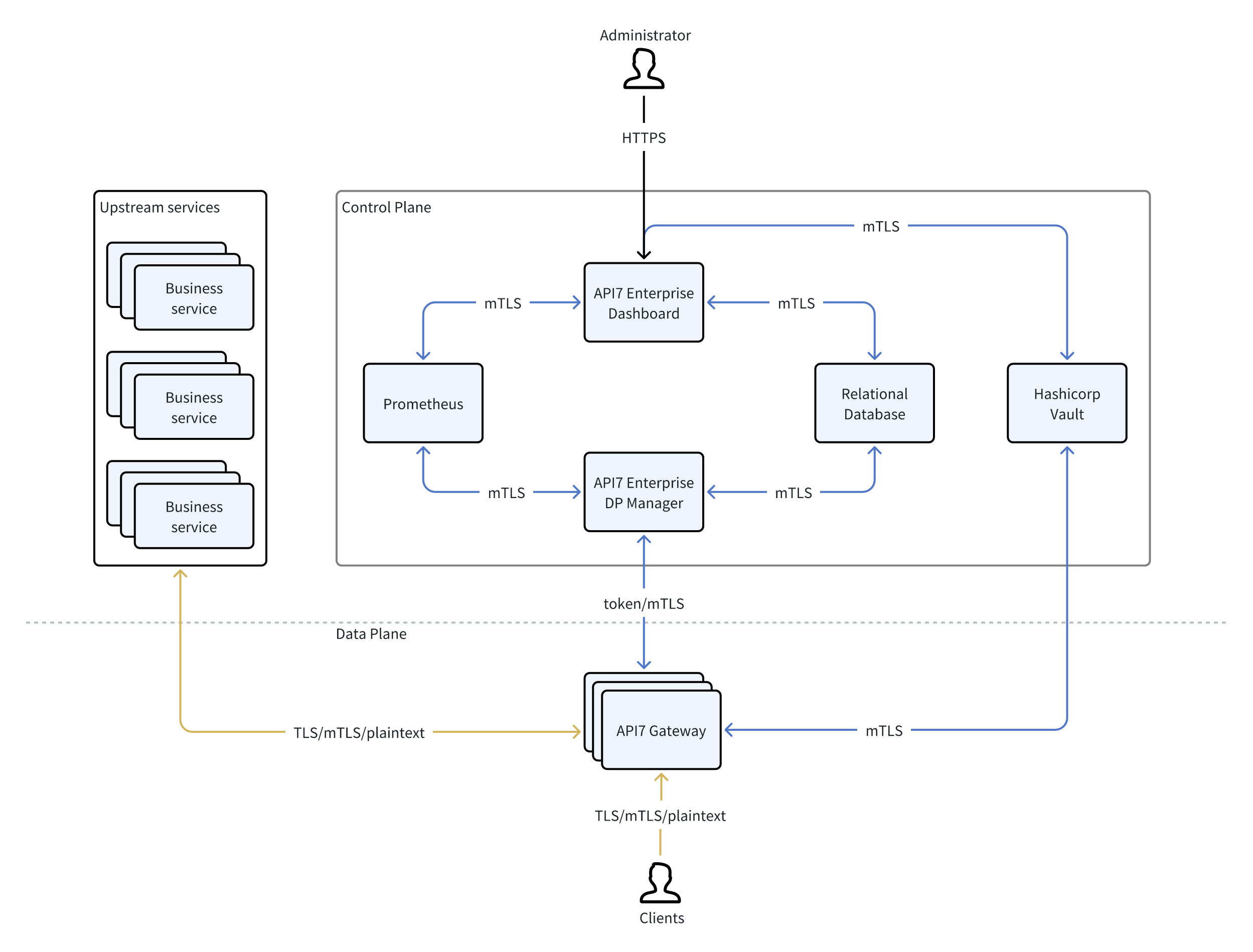
note
The specific details shown in the diagram may vary depending on how the system is deployed.
This document provides a reference explaining where sensitive information in API7 Gateway is, how it is stored, and how it is protected.
Deployment Models (AWS)
Below are the deployment models for hosting API7 Gateway in AWS.
Client-Managed Deployment
In the client-managed deployment model, both the control plane (CP) and data plane (DP) are deployed in your AWS environment.
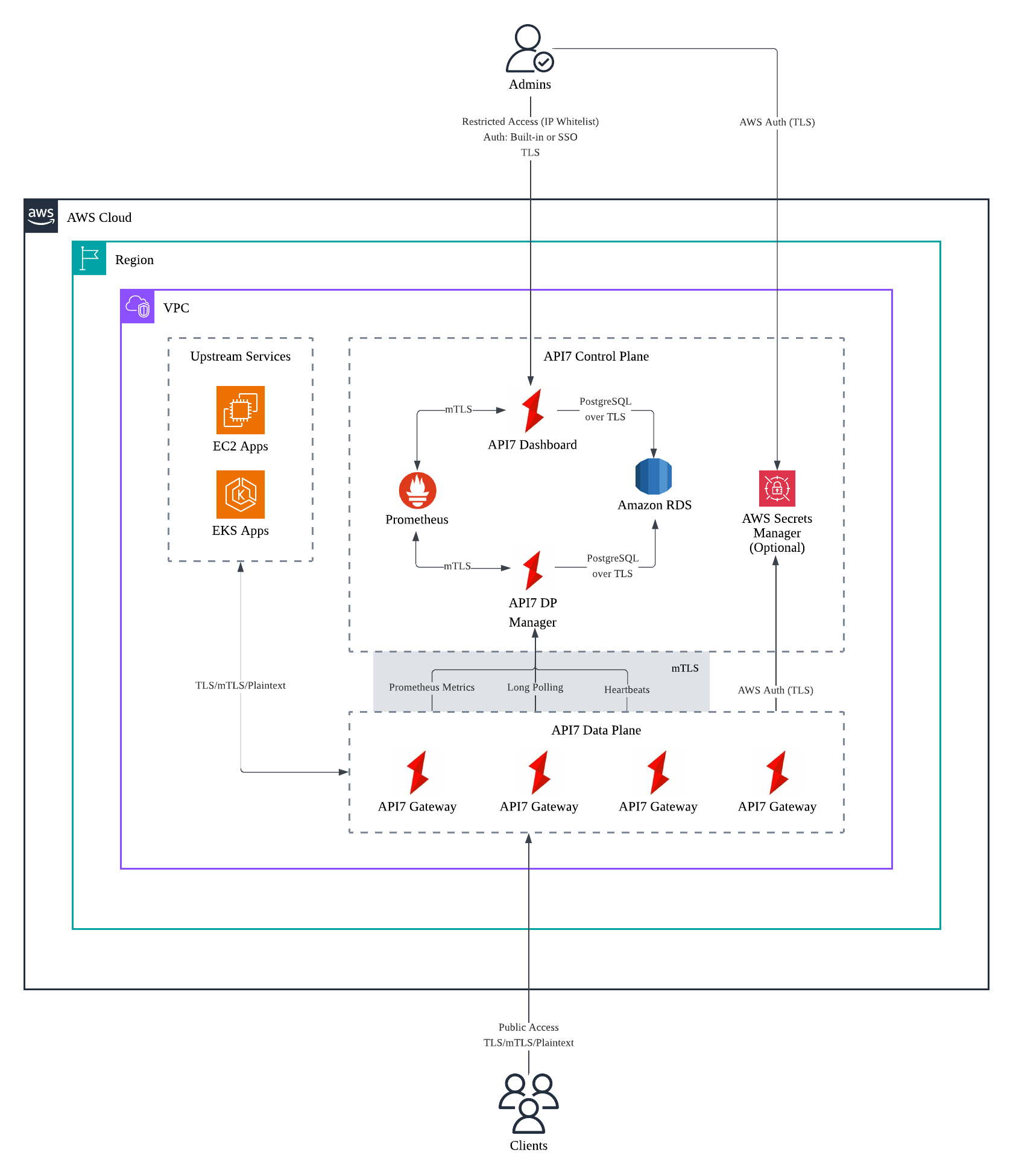
Hybrid-Managed Deployment
In the hybrid-managed deployment model, the control plane (CP) is hosted in API7’s AWS environment, while the data plane (DP) is hosted in your AWS environment.
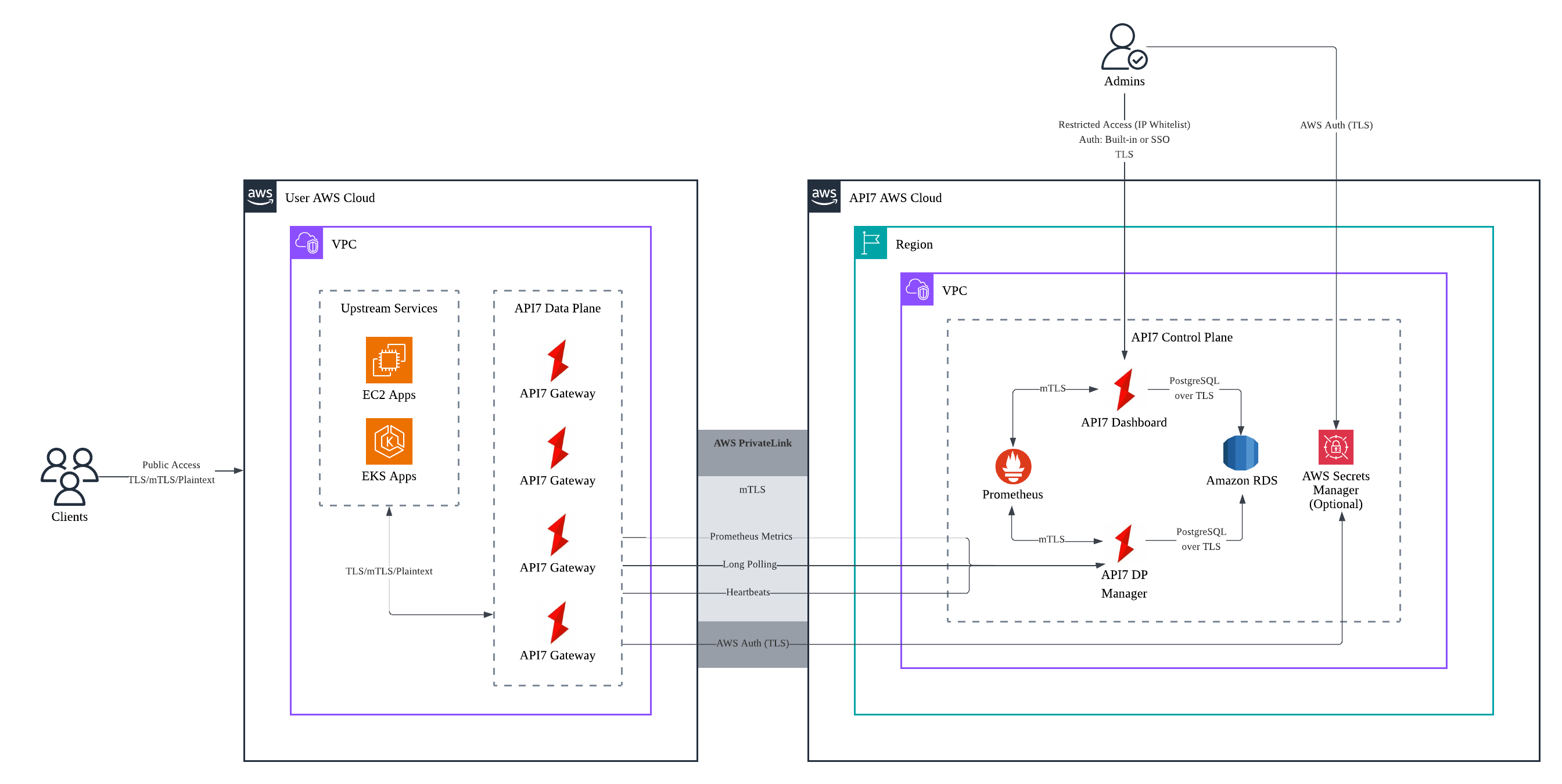
Data Storage
- Business data is stored in the database.
- Gateway metrics are stored in Prometheus.
- Gateway access logs and error logs are stored locally on each gateway instance by default, but they can also be forwarded to external logging services if needed.
Specifically, the database stores the following types of business data:
- Gateway configuration data: Entities that define gateway behavior, such as services, routes, consumers, SSL certificates, and other core resources.
- Management and operational data: Administrative and governance-related information, including control plane administrators, RBAC policies, SSO authentication configuration, and audit logs.
Control Plane (CP)
Database Connection Credentials
Database connection credentials are stored in the control plane's configuration files. They can also be stored in environment variables and injected into the configuration files.
Plugin Resources
Sensitive plugin fields can be named in encrypt_fields in the plugin schema so that they are encrypted (with the data plane's AES-128-CBC keyring, see Keyring and Data Encryption below) before being saved to the database — but only when data_encryption is enabled. It is disabled by default, so out of the box these fields are saved as submitted, not encrypted.
The keyring used to encrypt sensitive information differs by gateway group and it is also encrypted before being saved to the database.
SSL Resources
For SSL resources, the private key is AES-encrypted at rest in the database. It is also never returned by a subsequent read: GET/LIST on an SSL resource returns only metadata plus the public certificate, never the key field. The create/update response is an exception — it echoes back the private key you just submitted, the same way it echoes every other field in the request body.
Dashboard Connections
Dashboard connections use TLS by default. If no certificates are configured, API7 uses self-signed certificates.
Audit
Sensitive information, such as passwords, is masked in audit logs before the logs are saved to the database. Any additional alteration to audit logs is forbidden.
User Credentials
User credentials, including username and password, as well as an access token, are salted and PBKDF2 encrypted before being saved to the database.
Encryption Algorithms
In cases where the field should not be reversible, the hashing algorithm would be PBKDF2 with salt.
In cases where the field should be reversible, the encryption algorithm would be AES.
Keyring and Data Encryption
data_encryption in the gateway's config.yaml is false by default. When enabled, API7 Gateway encrypts the plugin fields named in encrypt_fields with the data plane's AES-128-CBC keyring before writing them to the database.
  data_encryption:
    enable: false
    keyring:
      - qeddd145sfvddff3
A keyring is an ordered list of 16-byte encryption keys. qeddd145sfvddff3 above is the value shipped in the gateway's default configuration file, not a placeholder generated for you — it is a fixed, publicly known string. If you enable data_encryption, replace every key in the keyring with your own secret value before storing any real data; leaving the shipped default in place is equivalent to not encrypting the data at all, since anyone with the source or the default config file already has the key. Rotate the keyring periodically after that.
When rotating, add the new key at the top of the array and leave the old keys in place. The gateway decrypts with any key in the ring but encrypts with the first. Removing an old key while data encrypted under it still exists makes that data permanently unrecoverable.
The Helm chart for the data plane does not expose data_encryption or keyring as chart values — grep the chart's values.yaml and you will not find them. The only way to set them through Helm is apisix.enableCustomizedConfig: true, which hands the chart's entire config.yaml to apisix.customizedConfig and stops the chart from managing every other gateway setting it would otherwise render for you (see Helm Chart). There is currently no supported way to turn on data encryption for a Helm-deployed data plane without taking over the full configuration file.
Data Plane (DP)
Between clients and API7 Gateway, as well as API7 Gateway and upstream services, you can configure TLS or mTLS to secure the communication.
Communication Between DP and CP
Communication between the DP and CP can be secured using mTLS, through which long polling, heartbeat, and Prometheus metrics traffic is transmitted. The CP stores the server and CA certificates. The DP (each gateway instance) stores the client certificate.