

Canary Deployment
Learn about the canary deployment strategy in Apache APISIX, allowing for gradual rollouts of new features while minimizing risk.
A canary deployment is a strategy for rolling out a new release by gradually increasing the traffic directed to it. This strategy can help test the new release with real traffic to identify and fix any issues before making it generally available.
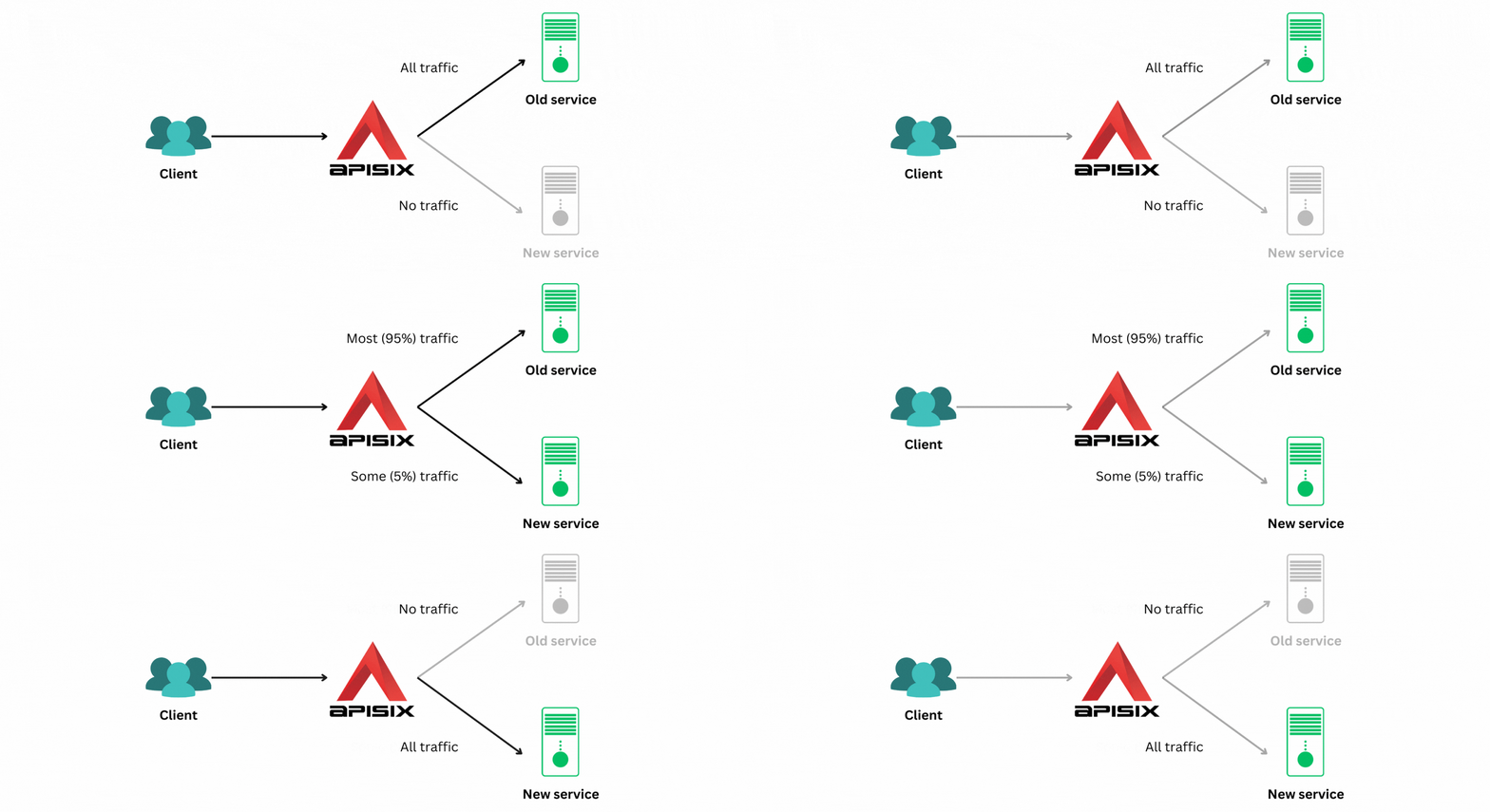
This guide will walk you through configuring canary deployments in APISIX using the traffic-split (opens in Plugin Hub docs) plugin.
Configure Canary Deployment
You will be using httpbin.org and mock.api7.ai as the old and new services.
First, direct all traffic to your old service. To do this, create a route with the following configuration:
curl "http://127.0.0.1:9180/apisix/admin/routes" -X PUT \
  -H "X-API-KEY: ${ADMIN_API_KEY}" \
  -d '{
    "uri": "/headers",
    "id": "canary-deployment",
    "plugins": {
      "traffic-split": {
        "rules": [
          {
            "weighted_upstreams": [
              {
                "upstream": {
                  "type": "roundrobin",
                  "scheme": "https",
                  "pass_host": "node",
                  "nodes": {
                    "httpbin.org:443":1
                  }
                },
                "weight": 100
              },
              {
                "weight": 0
              }
            ]
          }
        ]
      }
    },
    "upstream": {
      "type": "roundrobin",
      "scheme": "https",
      "pass_host": "node",
      "nodes": {
        "mock.api7.ai:443":1
      }
    }
  }'
❶ 100% of the requests should be routed to httpbin.org.
❷ 0% of the requests should be routed to mock.api7.ai.
routes:
  - uris:
      - /headers
    name: canary-deployment
    plugins:
      traffic-split:
        rules:
          - weighted_upstreams:
              - weight: 100
                upstream:
                  type: roundrobin
                  pass_host: node
                  nodes:
                    httpbin.org:443: 1
                  scheme: https
              - weight: 0
    upstream:
      type: roundrobin
      pass_host: node
      nodes:
        mock.api7.ai:443: 1
      scheme: https
❶ 100% of the requests should be routed to httpbin.org.
❷ 0% of the requests should be routed to mock.api7.ai.
Synchronize the configuration to APISIX:
adc sync -f apisix.yamlSo, if you send 100 requests, APISIX will direct them all to httpbin.org:
resp=$(seq 100 | xargs -I{} curl "http://127.0.0.1:9080/headers" -sL) && \
  count_httpbin=$(echo "$resp" | grep "httpbin.org" | wc -l) && \
  count_mockapi7=$(echo "$resp" | grep "mock.api7.ai" | wc -l) && \
  echo httpbin.org: $count_httpbin, mock.api7.ai: $count_mockapi7
You will get the following response:
httpbin.org: 100, mock.api7.ai: 0Next, update the configuration to direct 5% of the requests to the new service:
curl "http://127.0.0.1:9180/apisix/admin/routes" -X PUT \
  -H "X-API-KEY: ${ADMIN_API_KEY}" \
  -d '{
    "uri": "/headers",
    "id": "canary-deployment"
    "plugins": {
      "traffic-split": {
        "rules": [
          {
            "weighted_upstreams": [
              {
                "upstream": {
                  "type": "roundrobin",
                  "scheme": "https",
                  "pass_host": "node",
                  "nodes": {
                    "httpbin.org:443":1
                  }
                },
                "weight": 95
              },
              {
                "weight": 5
              }
            ]
          }
        ]
      }
    },
    "upstream": {
      "type": "roundrobin",
      "scheme": "https",
      "pass_host": "node",
      "nodes": {
        "mock.api7.ai:443":1
      }
    }
}'routes:
- uris:
- /headers
name: canary-deployment
plugins:
traffic-split:
rules:
- weighted_upstreams:
- weight: 95
upstream:
type: roundrobin
pass_host: node
nodes:
httpbin.org:443: 1
scheme: https
- weight: 5
upstream:
type: roundrobin
pass_host: node
nodes:
mock.api7.ai:443: 1
scheme: httpsSynchronize the configuration to APISIX:
adc sync -f apisix.yamlNow, if you send 100 requests, 5 of them will be directed to mock.api7.ai:
resp=$(seq 100 | xargs -I{} curl "http://127.0.0.1:9080/headers" -sL) && \
  count_httpbin=$(echo "$resp" | grep "httpbin.org" | wc -l) && \
  count_mockapi7=$(echo "$resp" | grep "mock.api7.ai" | wc -l) && \
  echo httpbin.org: $count_httpbin, mock.api7.ai: $count_mockapi7
The response will be as follows:
httpbin.org: 95, mock.api7.ai: 5The idea behind a canary deployment is to test the new release with a small subset of the requests to minimize the impact of any issues. Once this release is tested, gradually increase the percentage of requests sent to the new release until all requests are routed to it:
curl "http://127.0.0.1:9180/apisix/admin/routes" -X PUT \
  -H "X-API-KEY: ${ADMIN_API_KEY}" \
  -d '{
    "uri": "/headers",
    "id": "canary-deployment"
    "plugins": {
      "traffic-split": {
        "rules": [
          {
            "weighted_upstreams": [
              {
                "upstream": {
                  "type": "roundrobin",
                  "scheme": "https",
                  "pass_host": "node",
                  "nodes": {
                    "httpbin.org:443":1
                  }
                },
                "weight": 0
              },
              {
                "weight": 100
              }
            ]
          }
        ]
      }
    },
    "upstream": {
      "type": "roundrobin",
      "scheme": "https",
      "pass_host": "node",
      "nodes": {
        "mock.api7.ai:443":1
      }
    }
}'routes:
- uris:
- /headers
name: canary-deployment
plugins:
traffic-split:
rules:
- weighted_upstreams:
- weight: 0
upstream:
type: roundrobin
pass_host: node
nodes:
httpbin.org:443: 1
scheme: https
- weight: 100
upstream:
type: roundrobin
pass_host: node
nodes:
mock.api7.ai:443: 1
scheme: httpsSynchronize the configuration to APISIX:
adc sync -f apisix.yamlNow, all requests will be directed to mock.api7.ai:
resp=$(seq 100 | xargs -I{} curl "http://127.0.0.1:9080/headers" -sL) && \
  count_httpbin=$(echo "$resp" | grep "httpbin.org" | wc -l) && \
  count_mockapi7=$(echo "$resp" | grep "mock.api7.ai" | wc -l) && \
  echo httpbin.org: $count_httpbin, mock.api7.ai: $count_mockapi7
This is evident from the response:
httpbin.org: 0, mock.api7.ai: 100If the new release has issues, rollback to the old service by updating the configuration until the issue is resolved.
Configure Advanced Canary Deployment
You can also deploy your releases in a more granular fashion using the traffic-split plugin. The example below shows how to route requests based on a header.
This is useful when you want to give your clients more control over which release they access. A client can fall back to the old release by modifying or removing the header.
Configure this in a route as shown below:
curl "http://127.0.0.1:9180/apisix/admin/routes" -X PUT \
  -H "X-API-KEY: ${ADMIN_API_KEY}" \
  -d '{
    "uri": "/headers",
    "id": "canary-deployment",
    "plugins": {
      "traffic-split": {
        "rules": [
          {
            "match": [
              {
                "vars": [
                  ["http_release","==","new"]
                ]
              }
            ],
            "weighted_upstreams": [
              {
                "upstream": {
                  "type": "roundrobin",
                  "scheme": "https",
                  "pass_host": "node",
                  "nodes": {
                    "mock.api7.ai:443":1
                  }
                }
              }
            ]
          }
        ]
      }
    },
    "upstream": {
      "type": "roundrobin",
      "scheme": "https",
      "pass_host": "node",
      "nodes": {
        "httpbin.org:443":1
      }
    }
}'routes:
- uris:
- /headers
name: canary-deployment
plugins:
traffic-split:
rules:
- match:
- vars:
- - http_release
- ==
- new
weighted_upstreams:
- weight: 1
upstream:
type: roundrobin
pass_host: node
nodes:
mock.api7.ai:443: 1
scheme: https
upstream:
type: roundrobin
pass_host: node
nodes:
httpbin.org:443: 1
scheme: httpsSynchronize the configuration to APISIX:
adc sync -f apisix.yamlNow, when you send a request with the release header:
curl "http://127.0.0.1:9080/headers" -H 'release: new'You will see a response back from mock.api7.ai:
{
  "headers": {
    "accept": "*/*",
    "host": "mock.api7.ai",
    ...
  }
}
If you do not specify the release header:
curl "http://127.0.0.1:9080/headers"APISIX will fall back to the httpbin.org upstream:
{
  "headers": {
    "Accept": "*/*",
    "Host": "httpbin.org",
    ...
  }
}
Refer to the traffic-split (opens in Plugin Hub docs) plugin documentation to learn more.