

API7 Docs
Authentication

OpenID Connect

The openid-connect plugin integrates with OIDC providers like Keycloak and Auth0, simplifying user authentication in API management.

The openid-connect plugin supports the integration with OpenID Connect (OIDC) identity providers, such as Keycloak, Auth0, Microsoft Entra ID, Google, Amazon Cognito, and Okta. It allows APISIX to authenticate clients and obtain their information from the identity provider before allowing or denying their access to upstream protected resources.

Examples

Authorization Code Flow

The authorization code flow is defined in RFC 6749, Section 4.1. It involves exchanging a temporary authorization code for an access token, and is typically used by confidential and public clients.

The following diagram illustrates the interaction between different entities when you implement the authorization code flow:

mR1eqav4nqjblight_Resource ServermR1eqav4nqjblight_Authorization ServermR1eqav4nqjblight_APISIXmR1eqav4nqjblight_User AgentmR1eqav4nqjblight_UsermR1eqav4nqjblight_Resource ServermR1eqav4nqjblight_Authorization ServermR1eqav4nqjblight_APISIXmR1eqav4nqjblight_User AgentmR1eqav4nqjblight_UserFind no valid access token in the cookieAuthenticate the userCreate a cookie and save the access tokenFind valid access token in the cookieRequest to access protected resourceRedirect user to authorization serverRequest authorization serverRespond with the authentication formSubmit credentialsSend the credentials with the redirect URIRedirect to redirection URI with authorization code, state, and session stateRequest mR1eqav4nqjblight_APISIX with authorization code, state, and session statePresent the authorization code to token endpointReturn an access tokenRedirect to redirection URI with the cookieRequest to access protected resource with the cookieRequest for protected resource with the access tokenRequest to validate the access tokenReturn the validation resultIf token validation was successful, return the requested resource
mR1eqav4nqjbdark_Resource ServermR1eqav4nqjbdark_Authorization ServermR1eqav4nqjbdark_APISIXmR1eqav4nqjbdark_User AgentmR1eqav4nqjbdark_UsermR1eqav4nqjbdark_Resource ServermR1eqav4nqjbdark_Authorization ServermR1eqav4nqjbdark_APISIXmR1eqav4nqjbdark_User AgentmR1eqav4nqjbdark_UserFind no valid access token in the cookieAuthenticate the userCreate a cookie and save the access tokenFind valid access token in the cookieRequest to access protected resourceRedirect user to authorization serverRequest authorization serverRespond with the authentication formSubmit credentialsSend the credentials with the redirect URIRedirect to redirection URI with authorization code, state, and session stateRequest mR1eqav4nqjbdark_APISIX with authorization code, state, and session statePresent the authorization code to token endpointReturn an access tokenRedirect to redirection URI with the cookieRequest to access protected resource with the cookieRequest for protected resource with the access tokenRequest to validate the access tokenReturn the validation resultIf token validation was successful, return the requested resource

When an incoming request does not contain an access token in its header nor in an appropriate session cookie, the plugin acts as a relying party and redirects to the authorization server to continue the authorization code flow.

After successful authentication, the plugin keeps the token in the session cookie, and subsequent requests will use the token stored in the cookie.

See Implement Authorization Code Grant for an example to use the openid-connect plugin to integrate with Keycloak using the authorization code flow.

See Secure OIDC with PAR and DPoP for an example to use the openid-connect plugin to integrate with Keycloak using PAR, DPoP, PKCE, and private_key_jwt client authentication.

Proof Key for Code Exchange (PKCE)

The Proof Key for Code Exchange (PKCE) is defined in RFC 7636. PKCE enhances the authorization code flow by adding a code challenge and verifier to prevent authorization code interception attacks.

The following diagram illustrates the interaction between different entities when you implement the authorization code flow with PKCE:

mR3mqav4nqjblight_Resource ServermR3mqav4nqjblight_Authorization ServermR3mqav4nqjblight_APISIXmR3mqav4nqjblight_User AgentmR3mqav4nqjblight_UsermR3mqav4nqjblight_Resource ServermR3mqav4nqjblight_Authorization ServermR3mqav4nqjblight_APISIXmR3mqav4nqjblight_User AgentmR3mqav4nqjblight_UserGenerate code verifier and code challengeAuthenticate the userCreate a cookie and save the tokensRequest to access protected resourceRedirect user to authorization endpoint with code challengeRequest authorization endpointRespond with the authentication formSubmit credentialsSend credentialsRedirect to redirection URI with authorization code and stateRequest mR3mqav4nqjblight_APISIX with authorization code and stateExchange authorization code and code verifier for tokensReturn tokensRedirect to redirection URI with the cookieRequest to access protected resource with the cookieRequest protected resource with the access tokenReturn the requested resource
mR3mqav4nqjbdark_Resource ServermR3mqav4nqjbdark_Authorization ServermR3mqav4nqjbdark_APISIXmR3mqav4nqjbdark_User AgentmR3mqav4nqjbdark_UsermR3mqav4nqjbdark_Resource ServermR3mqav4nqjbdark_Authorization ServermR3mqav4nqjbdark_APISIXmR3mqav4nqjbdark_User AgentmR3mqav4nqjbdark_UserGenerate code verifier and code challengeAuthenticate the userCreate a cookie and save the tokensRequest to access protected resourceRedirect user to authorization endpoint with code challengeRequest authorization endpointRespond with the authentication formSubmit credentialsSend credentialsRedirect to redirection URI with authorization code and stateRequest mR3mqav4nqjbdark_APISIX with authorization code and stateExchange authorization code and code verifier for tokensReturn tokensRedirect to redirection URI with the cookieRequest to access protected resource with the cookieRequest protected resource with the access tokenReturn the requested resource

See Implement Authorization Code Grant for an example to use the openid-connect plugin to integrate with Keycloak using the authorization code flow with PKCE.

Authorization Code Flow with PAR and DPoP

PAR, PKCE, private_key_jwt, and DPoP can be combined in one authorization code flow. Configure separate signing keys for client authentication and DPoP. This workflow was introduced in API7 Enterprise 3.9.18 and 3.10.5, and in APISIX 3.18.0.

UpstreamAuthorization ServerGatewayUser AgentUpstreamAuthorization ServerGatewayUser AgentHold separate client-authenticationand DPoP signing keysopt[Request user information]Request protected resourcePARclient assertion, PKCE challenge, dpop_jktReturn request_uriRedirect with client_id and request_uriAuthenticate and authorizeRedirect with authorization code and stateSend authorization code and stateToken requestcode, PKCE verifier, client assertion, DPoP proofReturn DPoP-bound access tokentoken_type = DPoPUser-info requestDPoP access token and proof with athReturn user informationRedirect to requested resourcewith session cookieRequest protected resourcewith session cookieForward authenticated requestReturn responseReturn response

In this workflow, the gateway is the DPoP client for token and user-info calls to the authorization server. It does not validate DPoP proofs from external clients calling the protected route.

For an APISIX deployment, see Secure OIDC with PAR and DPoP for a tested Keycloak example with key generation, configuration, and verification.

Client Credential Flow

The client credential flow is defined in RFC 6749, Section 4.4. It involves clients requesting an access token with its own credentials to access protected resources, typically used in machine to machine authentication and is not on behalf of a specific user.

The following diagram illustrates the interaction between different entities when you implement the client credential flow with local JWT verification, such as by configuring public_key or use_jwks:

mR6mqav4nqjblight_Resource ServermR6mqav4nqjblight_Authorization ServermR6mqav4nqjblight_APISIXmR6mqav4nqjblight_Client AppmR6mqav4nqjblight_Resource ServermR6mqav4nqjblight_Authorization ServermR6mqav4nqjblight_APISIXmR6mqav4nqjblight_Client AppFound no cached JWT verificationpublic_key takes precedence over use_jwksalt[public_key][use_jwks]Request access tokenReturn access tokenRequest for protected resource with the access tokenUse configured public keyRetrieve JWKSSelect matching keyValidate token locallyIf token validation was successful, request resourceReturn the requested resource
mR6mqav4nqjbdark_Resource ServermR6mqav4nqjbdark_Authorization ServermR6mqav4nqjbdark_APISIXmR6mqav4nqjbdark_Client AppmR6mqav4nqjbdark_Resource ServermR6mqav4nqjbdark_Authorization ServermR6mqav4nqjbdark_APISIXmR6mqav4nqjbdark_Client AppFound no cached JWT verificationpublic_key takes precedence over use_jwksalt[public_key][use_jwks]Request access tokenReturn access tokenRequest for protected resource with the access tokenUse configured public keyRetrieve JWKSSelect matching keyValidate token locallyIf token validation was successful, request resourceReturn the requested resource

See Implement Client Credentials Grant for an example to use the openid-connect plugin to integrate with Keycloak using the client credentials flow.

Introspection Flow

The introspection flow is defined in RFC 7662. It involves verifying the validity and details of an access token by querying an authorization server’s introspection endpoint.

In this flow, when a client presents an access token to the resource server, the resource server sends a request to the authorization server’s introspection endpoint, which responds with token details if the token is active, including information like token expiration, associated scopes, and the user or client it belongs to.

The following diagram illustrates the interaction between different entities when you implement the authorization code flow with token introspection:

mR8eqav4nqjblight_Resource ServermR8eqav4nqjblight_Authorization ServermR8eqav4nqjblight_APISIXmR8eqav4nqjblight_Client AppmR8eqav4nqjblight_Resource ServermR8eqav4nqjblight_Authorization ServermR8eqav4nqjblight_APISIXmR8eqav4nqjblight_Client AppRequest access tokenReturn access tokenRequest for protected resource with the access tokenRequest to validate the access tokenReturn the validation resultIf token validation was successful, request resourceReturn the requested resource
mR8eqav4nqjbdark_Resource ServermR8eqav4nqjbdark_Authorization ServermR8eqav4nqjbdark_APISIXmR8eqav4nqjbdark_Client AppmR8eqav4nqjbdark_Resource ServermR8eqav4nqjbdark_Authorization ServermR8eqav4nqjbdark_APISIXmR8eqav4nqjbdark_Client AppRequest access tokenReturn access tokenRequest for protected resource with the access tokenRequest to validate the access tokenReturn the validation resultIf token validation was successful, request resourceReturn the requested resource

See Implement Client Credentials Grant for an example to use the openid-connect plugin to integrate with Keycloak using the client credentials flow with token introspection.

Password Flow

The password flow is defined in RFC 6749, Section 4.3. It is designed for trusted applications, allowing them to obtain an access token directly using a user’s username and password. In this grant type, the client app sends the user’s credentials along with its own client ID and secret to the authorization server, which then authenticates the user and, if valid, issues an access token.

Though efficient, this flow is intended for highly trusted, first-party applications only, as it requires the app to handle sensitive user credentials directly, posing significant security risks if used in third-party contexts.

The following diagram illustrates the interaction between different entities when you implement the password flow:

mRa6qav4nqjblight_Resource ServermRa6qav4nqjblight_Authorization ServermRa6qav4nqjblight_APISIXmRa6qav4nqjblight_Client AppmRa6qav4nqjblight_UsermRa6qav4nqjblight_Resource ServermRa6qav4nqjblight_Authorization ServermRa6qav4nqjblight_APISIXmRa6qav4nqjblight_Client AppmRa6qav4nqjblight_UserProvide username and passwordRequest access tokenReturn access tokenRequest for protected resource with the access tokenRequest to validate the access tokenReturn the validation resultIf token validation was successful, request resourceReturn the requested resource
mRa6qav4nqjbdark_Resource ServermRa6qav4nqjbdark_Authorization ServermRa6qav4nqjbdark_APISIXmRa6qav4nqjbdark_Client AppmRa6qav4nqjbdark_UsermRa6qav4nqjbdark_Resource ServermRa6qav4nqjbdark_Authorization ServermRa6qav4nqjbdark_APISIXmRa6qav4nqjbdark_Client AppmRa6qav4nqjbdark_UserProvide username and passwordRequest access tokenReturn access tokenRequest for protected resource with the access tokenRequest to validate the access tokenReturn the validation resultIf token validation was successful, request resourceReturn the requested resource

See Implement Password Grant for an example to use the openid-connect plugin to integrate with Keycloak using the password flow.

Refresh Token Grant

The refresh token grant is defined in RFC 6749, Section 6. It enables clients to request a new access token without requiring the user to re-authenticate, using a previously issued refresh token. This flow is typically used when an access token expires, allowing the client to maintain continuous access to resources without user intervention. Refresh tokens are issued along with access tokens in certain OAuth flows and their lifespan and security requirements depend on the authorization server’s configuration.

The following diagram illustrates the interaction between different entities when implementing password flow with refresh token flow:

mRbmqav4nqjblight_Resource ServermRbmqav4nqjblight_Authorization ServermRbmqav4nqjblight_APISIXmRbmqav4nqjblight_Client AppmRbmqav4nqjblight_UsermRbmqav4nqjblight_Resource ServermRbmqav4nqjblight_Authorization ServermRbmqav4nqjblight_APISIXmRbmqav4nqjblight_Client AppmRbmqav4nqjblight_UserLog in with username & passwordRequest access token (password grant)Return access token and refresh tokenAccess resource with access tokenRequest to validate the access tokenReturn the validation resultIf token validation was successful, request resourceReturn the requested resourceAccess resource with expired access tokenAccess token expiredRequest new access token with refresh tokenReturn new access token (and possibly a new refresh token)Access resource with new access tokenRequest to validate the new access tokenReturn the validation resultIf new access token validation was successful, request resourceReturn the requested resource
mRbmqav4nqjbdark_Resource ServermRbmqav4nqjbdark_Authorization ServermRbmqav4nqjbdark_APISIXmRbmqav4nqjbdark_Client AppmRbmqav4nqjbdark_UsermRbmqav4nqjbdark_Resource ServermRbmqav4nqjbdark_Authorization ServermRbmqav4nqjbdark_APISIXmRbmqav4nqjbdark_Client AppmRbmqav4nqjbdark_UserLog in with username & passwordRequest access token (password grant)Return access token and refresh tokenAccess resource with access tokenRequest to validate the access tokenReturn the validation resultIf token validation was successful, request resourceReturn the requested resourceAccess resource with expired access tokenAccess token expiredRequest new access token with refresh tokenReturn new access token (and possibly a new refresh token)Access resource with new access tokenRequest to validate the new access tokenReturn the validation resultIf new access token validation was successful, request resourceReturn the requested resource

See Refresh Token for an example to use the openid-connect plugin to integrate with Keycloak using the password flow with token refreshes.

User Info

The UserInfo endpoint in OpenID Connect (OIDC) is defined in OpenID Connect Core 1.0, Section 5.3. It enables clients to retrieve additional claims about an authenticated user by presenting a valid access token. This endpoint is particularly useful for obtaining user profile information, such as name, email, and other attributes, after the user has been authenticated. The data returned by the UserInfo endpoint depends on the scope of the access token and the claims configured by the authorization server.

The following diagram illustrates the interaction between different entities when APISIX verifies the user info:

mRd6qav4nqjblight_Resource ServermRd6qav4nqjblight_Authorization ServermRd6qav4nqjblight_APISIXmRd6qav4nqjblight_Client AppmRd6qav4nqjblight_Resource ServermRd6qav4nqjblight_Authorization ServermRd6qav4nqjblight_APISIXmRd6qav4nqjblight_Client AppRequest access token (e.g. authorization code or password)Return access tokenRequest protected resourceRetrieve user infoVerify user infoIf user info is verified, request protected resourceReturn the requested resource
mRd6qav4nqjbdark_Resource ServermRd6qav4nqjbdark_Authorization ServermRd6qav4nqjbdark_APISIXmRd6qav4nqjbdark_Client AppmRd6qav4nqjbdark_Resource ServermRd6qav4nqjbdark_Authorization ServermRd6qav4nqjbdark_APISIXmRd6qav4nqjbdark_Client AppRequest access token (e.g. authorization code or password)Return access tokenRequest protected resourceRetrieve user infoVerify user infoIf user info is verified, request protected resourceReturn the requested resource

See Control Access by Examining User Information from External Identity Provider for an example to use the openid-connect plugin to integrate with Keycloak, and implement access control with the Enterprise acl plugin based on the user info.

Troubleshooting

This section covers a few commonly seen issues when working with this plugin to help you troubleshoot.

APISIX Cannot Connect to OpenID provider

If APISIX fails to resolve or cannot connect to the OpenID provider, double check the DNS settings in your configuration file config.yaml and modify as needed.

State Mismatch in an Authorization Callback

A callback can arrive after its authorization state was completed, replayed, or removed. In API7 Enterprise 3.9.18 and 3.10.5, and in APISIX 3.18.0, a stale GET callback outside Multi Auth is redirected to the originally requested URL. This starts a fresh authentication flow. If the identity provider still has an SSO session, the flow can complete without another prompt.

Callbacks that use another HTTP method, have no recoverable target URL, or run inside Multi Auth still fail instead of redirecting.

Identity Provider Temporarily Unavailable

In APISIX 3.18.0, an authorization callback containing the OAuth error temporarily_unavailable is redirected to the originally requested URL when its state can be verified. This restarts the authentication flow instead of returning 500 Internal Server Error.

Other OAuth errors, a missing or invalid state, and non-GET callbacks are not retried automatically.

No Session State Found

If you encounter a 500 internal server error with the following message in the log when working with authorization code flow, there could be a number of reasons.

the error request to the redirect_uri path, but there's no session state found

1. Incorrect Redirection URI

A common configuration error is to set redirect_uri to the same URI as the route. When a user requests the protected resource, the request directly reaches the redirection URI without a session cookie, which produces the no session state found error.

Configure redirect_uri as a fully qualified URI with a path that matches the route without being identical to the protected request path. For example, if the route uri is /api/v1/*, set redirect_uri to https://gateway.example.com/api/v1/redirect. Configure the same URI as an allowed redirect URI in the OpenID provider.

If redirect_uri is not configured or is a root-relative path beginning with /, the gateway constructs the URI from the request scheme and host. A fully qualified URI avoids relying on this request-derived origin.

2. Missing Session Secret

When bearer_only is false, explicitly configure session.secret. APISIX rejects the plugin configuration when this field is missing, whether configuration is stored in etcd or loaded from standalone YAML. Use at least 16 characters. In multi-instance deployments, use the same secret on every gateway instance that needs to read the encrypted session cookies.

Check if the SameSite cookie attribute is properly set (i.e. if your application needs to send the cookie cross sites) to see if this could be a factor that prevents the cookie being saved to the browser's cookie jar or being sent from the browser.

4. Upstream Sent Too Big Header

If you have NGINX sitting in front of APISIX to proxy client traffic, see if you observe the following error in NGINX's error.log:

upstream sent too big header while reading response header from upstream

If so, try adjusting proxy_buffers, proxy_buffer_size, and proxy_busy_buffers_size to larger values.

Alternatively, adjust the plugin's session_contents parameter to include only the necessary information. For instance, to include only the access token and refresh token, you can configure the plugin as such:

{
  ...
  "plugins": {
    "openid-connect": {
      ...,
      "session_contents": {
        "access_token": true
      }
    }
  }
}

Available options are id_token, user, enc_id_token, and access_token (which includes the refresh token). When this field is not configured, everything is included in the session.

5. Invalid Client Secret

Verify client_secret for flows that authenticate to the provider with a shared secret, such as token introspection or an authorization code flow without PKCE. The field is optional for bearer-only local JWT/JWKS validation, non-bearer PKCE, and applicable private_key_jwt modes. In a secret-bearing flow, an invalid value causes authentication to fail and no token is stored in the session.

The default introspection_endpoint_auth_method is client_secret_basic, which sends the client credentials in the Authorization header. If the provider expects them in the introspection request body, set the method to client_secret_post.

6. PKCE IdP Configuration

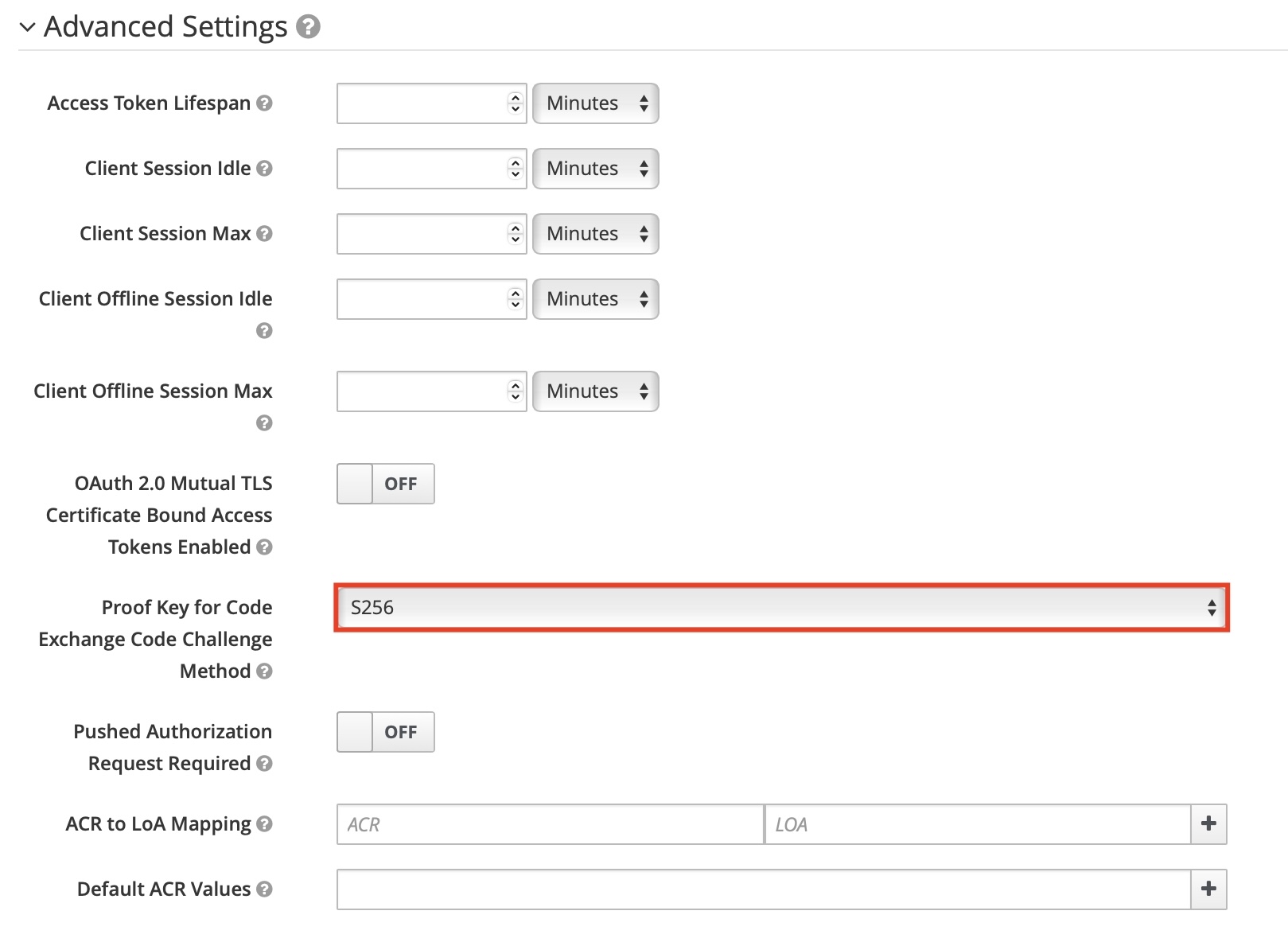
If you are enabling PKCE with the authorization code flow, make sure you have configured the IdP client to use PKCE. For example, in Keycloak, you should configure the PKCE challenge method in the client's advanced settings:
PKCE keycloak configuration