

Consumers
Understand the concept of consumers in Apache APISIX, which represent users or applications that interact with the API gateway and its services.
Overview
In APISIX, a consumer object represents a user, application, or host that sends requests to the API gateway and consumes backend services. It is used in conjunction with the authentication system; that is, every consumer is associated with at least one authentication plugin.
Use consumer objects when different consumers send requests to your system and you need APISIX to act per consumer, for example to apply rate limiting. APISIX plugins configured on the consumer provide those functions.
The following diagram illustrates an example of APISIX with one key-auth (opens in Plugin Hub docs) enabled route and two consumers, John and Jane. John and Jane each authenticates to the route with their credentials. Only authenticated requests are then allowed to access the upstream resource:
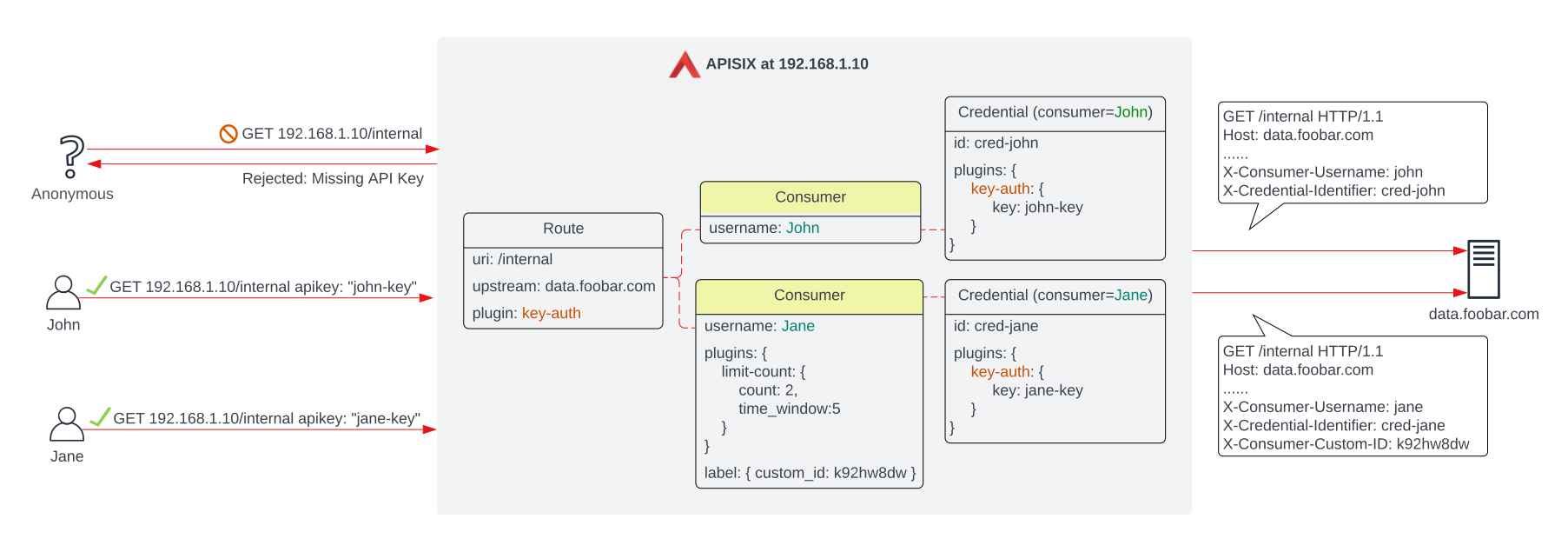
The configuration above ensures if a request is sent to APISIX:
- without any key or with a wrong key, the request is rejected.
- with
john-key, the request is authenticated and forwarded to the upstream service. - with
jane-key, the request is authenticated and forwarded to the upstream service. The rate limiting pluginlimit-count(opens in Plugin Hub docs) on the consumer also takes effect, limiting the number of requests to a maximum of 2 within any 5-second window. If the rate limit threshold is exceeded, the request will be rejected.
Note that when a consumer is successfully authenticated, APISIX adds additional headers, such as X-Consumer-Username, X-Credential-Identifier, X-Consumer-Custom-ID, to the request, before proxying it to the upstream service. The upstream service will be able to differentiate between consumers and implement additional logic as needed. If any of these values is not available, the corresponding header will not be added.
Passing consumer information to upstream
For use cases such as logging, analytics, and auditing, you can pass consumer information to upstream services. Consumer information is not exposed to the upstream by default; use the proxy-rewrite plugin to add the information you need to the header:
{
  "plugins":{
    ...,
    "proxy-rewrite":{
      "headers":{
        "set":{
          "X-Consumer-Name":"$consumer_name"
        }
      }
    }
  }
}
Consumer access restriction
You can control request access to your API by imposing restrictions based on consumer name, HTTP methods, or other parameters in the consumer-restriction plugin.
For example, if you want to blacklist Jane from accessing your upstream service without changing any consumers configuration in the example from overview, you can update the plugin's configuration in the route to the following:
{
  "plugins":{
    "key-auth":{},
    "consumer-restriction":{
      "blacklist":["Jane"]
    }
  }
}
Or, if you want to strictly allow FetchBot's access by HTTP GET method, you can update the plugin's configuration (in either the route or the consumer) to the following:
{
  "plugins":{
    ...,
    "consumer-restriction":{
      "allowed_by_methods":[
        {
          "user":"FetchBot",
          "methods":["GET"]
        }
      ]
    }
  }
}
The consumer-restriction (opens in Plugin Hub docs) plugin can also be used with routes, services, and consumer groups.
Authentication and authorization
There are two main design patterns for building authentication and authorization in an APISIX-based architecture.
The first and most commonly adopted approach is to authenticate and authorize requests through a third-party identity provider (IdP), such as Keycloak:
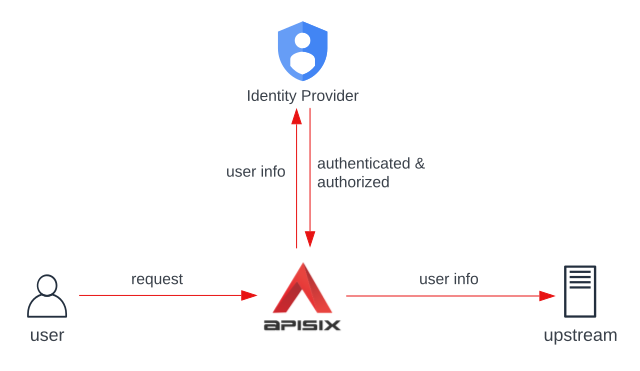
In some environments, a request might need to go through more than one IdP before it can be forwarded to the upstream service. In such cases, you can configure multiple authentication plugins, each corresponding to an IdP, on one consumer; only when all IdPs have granted access to a request will APISIX show a success response.
With multiple authentication plugins in place, the plugins order of execution is determined by the plugin's priority, which can be overridden with _meta.priority.
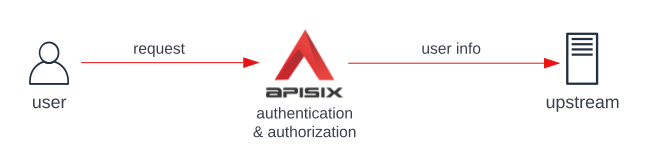
The second and a more basic approach is to perform authentication and authorization on the API gateway itself, using key-auth, basic-auth, jwt-auth, hmac-auth plugins:
The Admin API rejects a write that would give two consumers or credentials the same lookup key for key-auth, basic-auth, jwt-auth, hmac-auth, or LDAP authentication. The response is 400 Bad Request. The check uses the locally watched consumer view, so concurrent writes can still race, and values supplied through Secret or environment references cannot be resolved for this comparison. Audit existing consumers before an upgrade if those plugins are in use.
To configure authentication and authorization, see the authentication section in How-To Guides.
Related
Tasks that use this concept
Related concepts
- Admin API - Consumers
consumer-restriction(opens in Plugin Hub docs) plugin- Key Concepts - Credentials